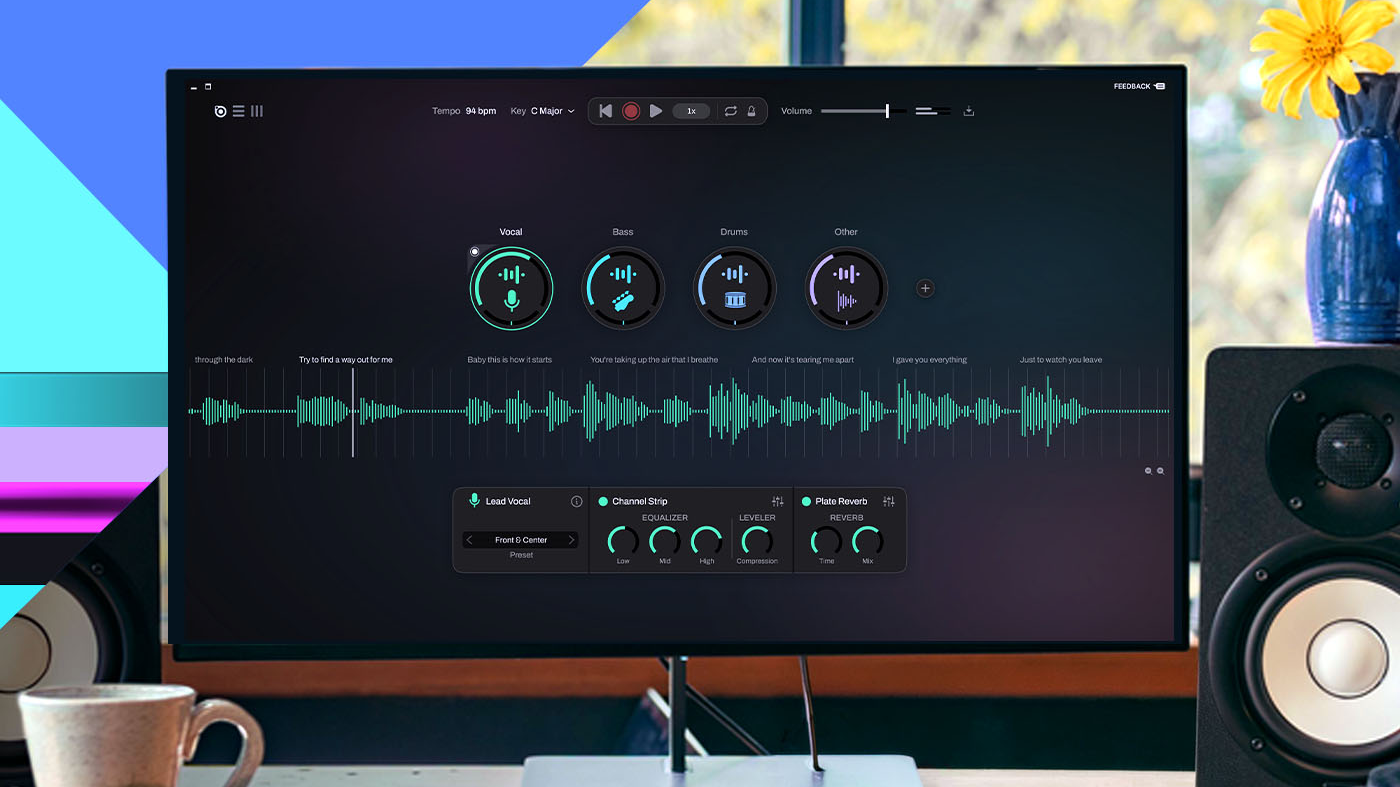
A Windows application called AudioPrism, priced at US$79.99 and currently $59.99, separates a finished recording into vocals, bass, drums and other instruments on your own machine, and New Atlas reports that it did so for a clean studio track on an RTX 5070 Ti in less time than it takes to spell out "Fast Fourier Transform." The same review found the separation excellent on Fleetwood Mac's Dreams and usable but artifact-heavy on a dense live recording, while the audio-to-MIDI conversion and the built-in trainer produced unpredictable results and stuttering playback. The reviewer's sharpest complaint was not about the hard part at all: having produced four clean stems, the app gave him no mixer, so he had to open Audacity to mute the bass and play along. You can read the full review at New Atlas.
Why this matters if you want a score out of a recording
The interesting thing in that review is not the 40 seconds. It is the split between what the machine does well and what it does badly.
Pulling a finished stereo mix apart used to be the hard problem. For most of recorded music's history the mix was final, and getting the ingredients back out was like recovering a RAW file from a JPEG. Machine learning changed that, from Spleeter and Demucs through to the MAL work done for The Beatles: Get Back. That problem is now largely solved, and AudioPrism is one more data point that it runs on a consumer GPU in under a minute.
The easy problem, the one a bass player would describe in one sentence, is still being missed. Solo the bass to learn the line. Mute the bass to play along with the band. A stem splitter that cannot do that in the app has done the miracle and then handed you a chore.
For anyone chasing notation rather than a play-along, the review contains a more useful warning. The reviewer fed the app its own remarkably clean bass stem and got back multipart MIDI he did not find useful as a transcription. Clean separation did not produce clean note data. Those are two different models doing two different jobs, and one being good tells you nothing about the other.
What changes in practice
The separation step is getting faster and cheaper, and it is moving onto local hardware. That changes the order of operations for anyone transcribing a busy mix.
| Step | What it does | Where it goes wrong |
|---|---|---|
| Separate the mix | Splits into vocals, drums, bass, other | Dense live recordings keep artifacts and reverb tails |
| Transcribe the stem | Turns one part into notation | Wrong notes where the stem is muddy or the part is fast |
| Export | PDF, MusicXML, MIDI | MIDI alone gives you no bars, beams or page layout |
| Edit by hand | Fixes what the model guessed | This is the part nobody budgets time for |
Separating first is usually what makes a transcription of a full band usable. Drums under everything, reverb tails, a bass line bleeding into the guitar mic: all of that confuses a transcription model. Give it a clean bass stem and it has a much better chance.
What does not change is the editing. A clean stem still produces a first draft. Fast runs, ghost notes, grace notes, anything with heavy compression or pitch correction will come back with errors, and you will fix them by ear. The review's MIDI result is a reminder that a good separator is not a good transcriber, and a good transcriber is not a good separator.
Our view
Local processing is the right call and it is worth paying attention to. No upload, no queue, no metered cloud compute. If you are working on unreleased material, a client's rough mix, or a worship set you recorded on Sunday, keeping the audio on your own machine is a real advantage rather than a marketing line.
The trade-off is that local means your GPU. A modest laptop will not do this in 40 seconds, and the review's timing is tied to specific hardware. Do not read a single benchmark as a promise about your machine.
The open question is whether the separation and the transcription stay in one product. The review suggests they should not have to. The separation was excellent, the MIDI was not, and the play-along features were the weakest part of the package. A tool that separates beautifully and exports clean stems into a DAW may be more useful than one that separates beautifully and then guesses at the notes.
Who should care: transcribers and arrangers working on dense material, producers pulling apart a reference track, and teachers building a practice version of a song for a student. Who should not: anyone transcribing a solo piano piece or a single guitar and voice. There is nothing to separate, and the extra step just adds artifacts.
One thing the review does not settle, and we cannot either: how this compares to what we run. We have not tested AudioPrism side by side with our own pipeline, so we will not claim a winner. Compare on the things you can check: which instruments are supported, whether it separates stems, what it exports, and whether the pricing is a one-off or a subscription.
And the rights point stands regardless of which tool you use. Separating a track you own for your own practice is one thing. Publishing, selling or performing a transcription of a copyrighted song is another, because a transcription is a derivative work. Rules differ by country. Talk to the rights holder or your local licensing body before anything goes public.
What to do next
If you want a score rather than stems, start with the mix you actually have. A solo recording can go straight in: transcribe a song and edit the draft. A full band needs the separation step first, then transcribe the stem you care about.
If you want the part in a DAW rather than on a page, the audio to MIDI converter gives you note data you can move, quantize and re-voice. If you want notation you can print and hand to a student, you need PDF and MusicXML out the other end, which is what our transcription export gives you.
If you are weighing tools, look at the shape of the offer rather than the headline number: pricing and plans explains ours, and it is worth reading next to whatever a desktop app charges, because a one-off purchase and a subscription behave very differently over a year.
If you would rather not start from scratch, browse Explore transcriptions to see what other people have already shared, and if you are building this into your own product, the transcription API is the door for that.