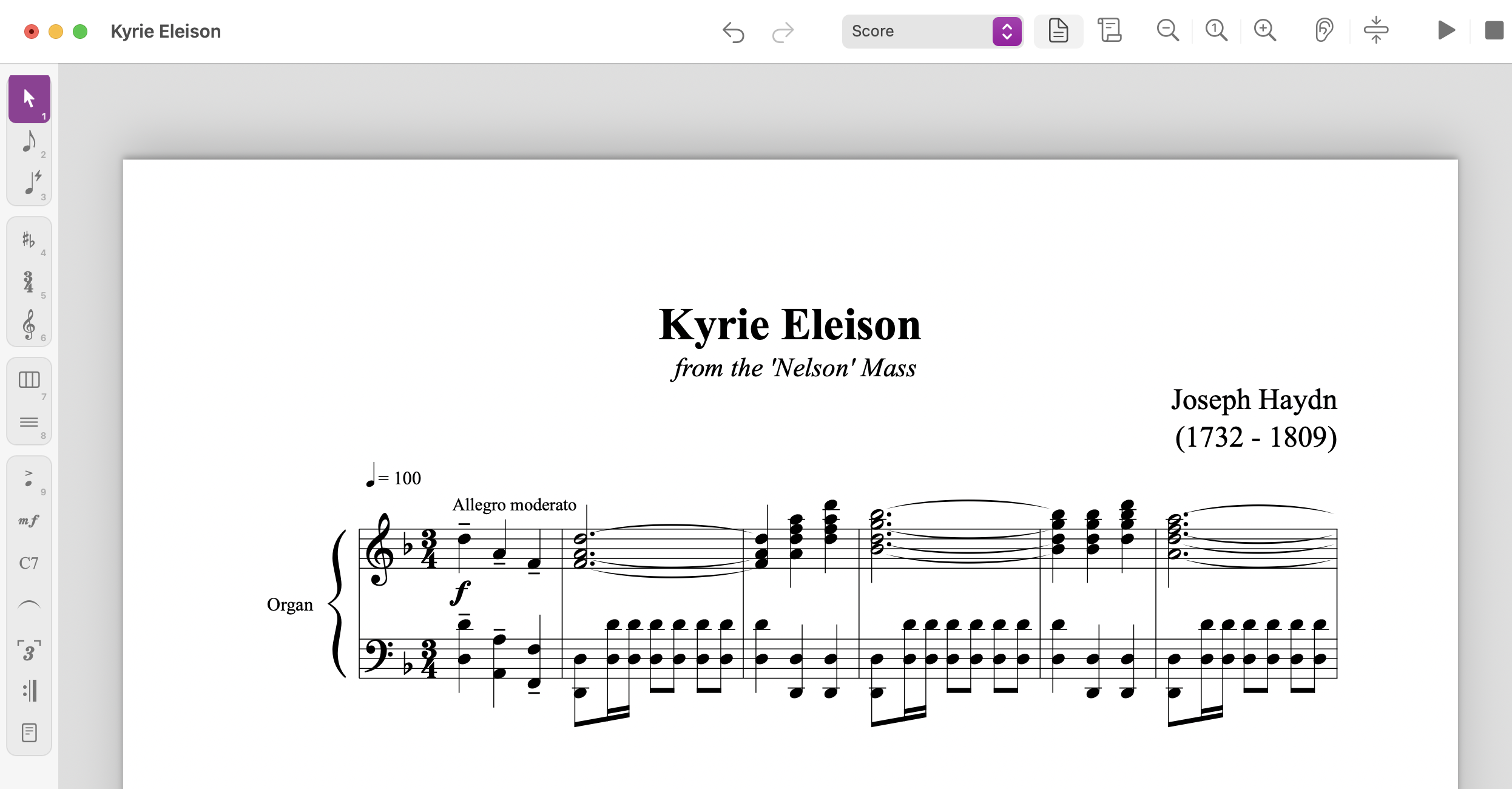
A free notation editor called Maestro can open Finale files without Finale installed. According to Scoring Notes, the Mac and Windows application reads both the newer .musx format and the older .mus format that Finale used through version 2012, and it can save back to .musx so a file can be reopened in Finale. It is a notation editor in its own right rather than a conversion utility: the interface borrows Finale's Simple Entry and Speedy Entry, the Main Tool Palette, four layers, Page View and Scroll View, and many of the same keyboard shortcuts. It is also free, and it is in beta. The first public version appeared on September 29, 2026, and by October 12 it had reached version 0.9.80, which is 80 releases in two weeks. If you are looking for free music notation software that can also rescue a folder of Finale scores, this is the first serious candidate.
Why this matters if you want a score out of a recording
Most of what we write about starts with audio: you have a track, you want notation. This story starts one step later, with notation that already exists and is trapped.
Anyone who has worked in Finale for twenty years has a folder of .mus and .musx files that nothing else opens. Dorico, Sibelius and MuseScore Studio do not read them natively, and Scoring Notes is explicit that this has not changed. MusicXML has been the bridge, and getting a hundred charts across that bridge one at a time is a job nobody wants.
Maestro's batch conversion to MusicXML is the part that matters most for working musicians and for schools. It converts entire folders of .mus and .musx files, subfolders included, without Finale installed. That is the difference between an archive you can migrate and an archive you keep a dead machine around to open.
It also matters for the other direction. If you transcribe by hand into Finale and your clients or your school still run Finale, you now have a way to hand over .musx files without owning the program yourself.
What it changes in practice, and what it does not
The honest summary: musical content travels, appearance does not.
| Item | What Maestro does |
|---|---|
| .musx files | Opens them |
| .mus files | Opens those from Finale 2000 onward |
| Older .mus files | Finale 2000 to 2006 lose layout and percussion; early 1990s not supported |
| Notes, articulations, dynamics, slurs, expressions, lyrics, repeats | Imported |
| Chord symbols | Imported from .musx, not yet from .mus |
| Linked parts | Edits made only in parts are not preserved; parts are rebuilt from the score |
| Spacing and engraving | Maestro uses its own spacing rules, not Finale's engine |
| Saving | Exports .musx, but with Maestro's layout, and Finale must recreate linked parts |
That table is the whole decision. If your Finale files are lead sheets and simple arrangements, you will likely get something usable with light cleanup. If they are professionally engraved scores and parts with hundreds of manual spacing and layout adjustments, the notes will arrive and the page turns will not.
Two other gaps are worth naming. Maestro does not currently offer equivalents of FinaleScript, TGTools or Lua plug-ins, which many advanced Finale workflows depend on. And it requires macOS 13 Ventura or later, or 64-bit Windows 10 or 11, with the Windows installer not yet digitally signed, though a version is available through the Microsoft Store.
What it does not change: the advice to keep MusicXML as your interchange format. Maestro can write MusicXML, so the sane pipeline is Finale file in, MusicXML out, open in Dorico or MuseScore Studio, fix the layout there. Do not make a beta your permanent home for anything you plan to print.
Maestro also opens MuseScore files directly without going through MusicXML, and imports notation from PDFs exported by Finale, Sibelius and Dorico. For scanned scores it can call on the open-source Audiveris for optical music recognition. Scoring Notes is clear that the accuracy of those features has not been evaluated yet, so treat them as promising rather than proven.
Our view
The interesting thing here is not the feature list. It is that Finale's file formats are being read by something other than Finale, and that the effort is being given away.
Scoring Notes notes that Robert Patterson's open-source Denigma could already read .musx files in early 2025, and that Denigma Online converts .musx to MusicXML in a browser. What Maestro adds is the older .mus format, which Denigma does not handle, and a full editing environment rather than a one-way door.
The trade-offs are real and they are the usual ones for a young tool. Beta software with 80 releases in two weeks is moving fast in both directions: features arrive quickly, and so do regressions. Engraving quality is the thing to watch, because that is where the hours live, and reproducing Finale's spacing engine is a much harder problem than parsing its file format. The developers appear to know this, since the limitations are documented on their own site rather than discovered by users.
There is also a licensing question that the announcement does not settle: what happens to files you convert and distribute. Maestro includes Finale's music fonts, which MakeMusic released under the SIL Open Font License with Finale v27. That covers the fonts. It does not cover the music. A transcription or arrangement of a copyrighted song is a derivative work, and moving it between file formats does not change that. The rules differ by country, so check with the rights holder or your local licensing body before you hand a converted chart to anyone outside your own practice room.
Who should care most: transcribers and arrangers with a deep Finale archive, schools and worship teams with years of charts, and anyone who still delivers .musx to a client. If you have ten files, export them by hand and move on. If you have a thousand, this is worth an afternoon.
Where it does not apply: if your source is a recording rather than a file, none of this helps you. Maestro reads notation that already exists. Getting notation out of audio is a different problem, and it is the one we work on.
What to do next
If you have a Finale archive, do this before you do anything else: copy the folder somewhere safe, then run a batch conversion to MusicXML on a small sample, not the whole archive. Open the results in MuseScore Studio or Dorico and check the things that break first, which are page layout, linked part edits and percussion notation. Then decide whether the rest is worth converting.
If you are a transcriber delivering to Finale users, test whether Maestro's .musx export opens cleanly in Finale before you promise it to a client. If you are moving from Finale to another program, our piece on diagnosing notation files before you edit them covers the checks worth running on anything you import.
And if your starting point is a recording rather than a file, the workflow is different. Upload a track, separate it first with the stem splitter so the part you want is not buried in the mix, then take the result through the audio to MIDI converter if you want it in a DAW, or straight to notation if you want a score. Automatic transcription is a first draft you edit, and how much editing depends on the recording, how busy the mix is, the instrument, and whether you separated stems first. A full song usually takes a few minutes to tens of minutes depending on length and load, and the job page shows where you are in the queue. You can see what other people have shared in Explore, and the shape of the plans is on pricing.
Sources
- Maestro opens Finale files without Finale, Scoring Notes, October 12, 2026
- Notation Files: Diagnose Before You Edit